
Which Task is a Generative AI Task?
The answer is:
✅ Writing a poem based on a given theme
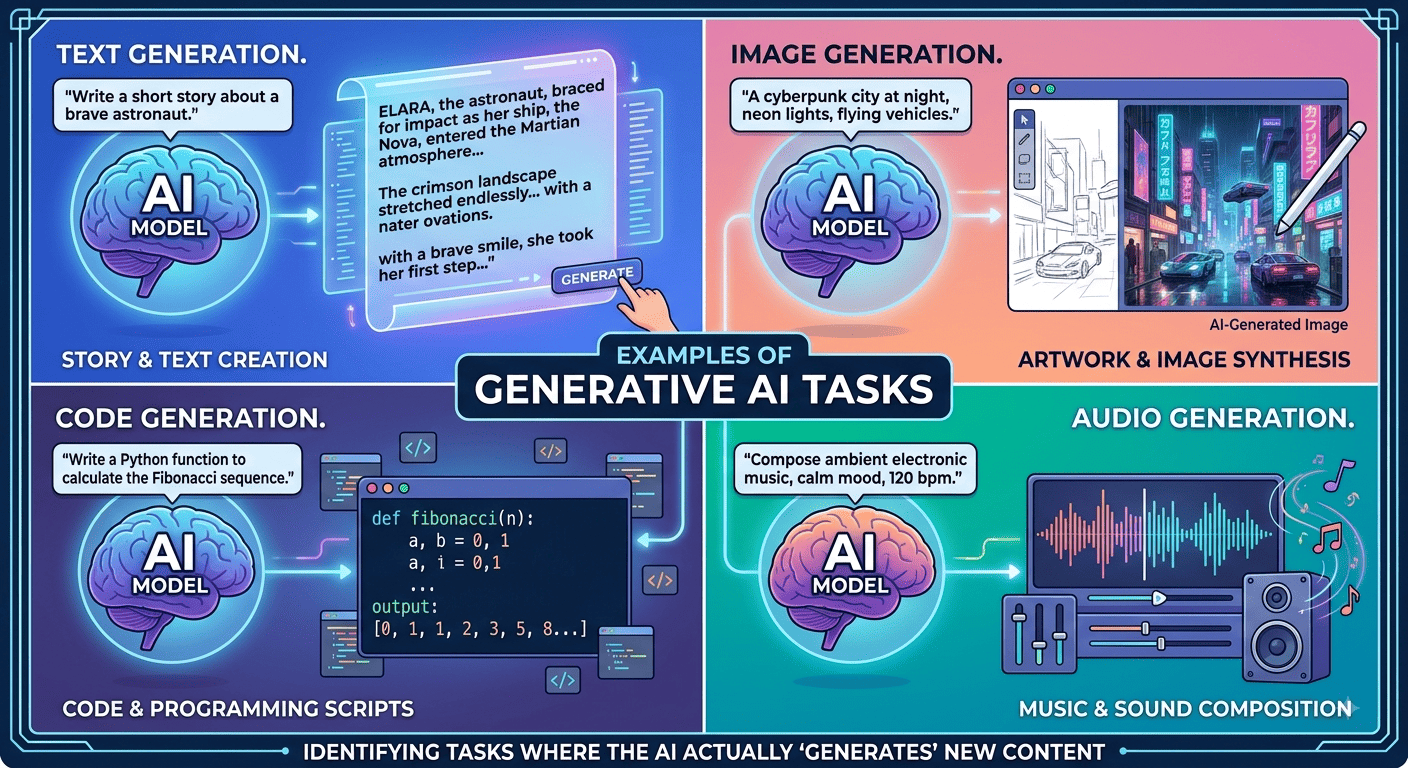
This is a Generative AI task because the AI creates new content—in this case, an original poem—based on the user’s prompt. Generative AI can create content such as text, images, audio, video, and code.
For the commonly used question, the options are:
- ❌ Calculating the total word count in an article
- ❌ Identifying the main topic of a news article
- ❌ Detecting credit card fraud
- ✅ Writing a poem based on a given theme
Simple Explanation
Generative AI creates new content. Therefore, when an AI is asked to write a poem, story, article, image, song, or code, it is performing a generative AI task.
Correct answer: Writing a poem based on a given theme.
A Generative AI task asks an artificial intelligence system to create new content.
The content can include text, images, audio, video, or computer code.
You give the AI clear instructions through a prompt.
Then, the AI processes your instructions and generates a response.
Generative AI can support writing, design, programming, marketing, education, and many other activities.
What Is a Generative AI Task?
A generative AI task involves asking AI to create something new.
You can describe what you need using simple instructions.
For example, you can ask AI to write an article.
You can also request an image from a written description.
The better your instructions, the more useful the result can become.
Simple definition: Generative AI creates new content from your instructions.
How to Use Generative AI
Using generative AI usually starts with a clear prompt.
A prompt tells the AI what you want it to create.
First, decide what you need from the AI.
Next, describe your requirements as clearly as possible.
For example, you could write:
“Write a 500-word article about healthy coffee drinks for beginners.”
The AI can then generate content based on your instructions.
You can also add specific requirements.
For example, mention the desired tone, audience, format, and word count.
Step 1: Choose Your Generative AI Task
Start by deciding what you want AI to create.
Common generative AI tasks include:
- Writing articles and blog posts
- Creating poems and stories
- Generating images
- Creating computer code
- Producing music and audio
- Generating videos
- Drafting emails
- Creating marketing content
- Writing product descriptions
- Creating social media posts
Choose one specific task before writing your prompt.
Step 2: Write a Clear Prompt
A prompt is the instruction you give to an AI system.
Clear prompts usually produce more useful results.
For example, avoid writing:
“Write about coffee.”
Instead, provide more information:
“Write a 700-word article about coffee drinks under 100 calories. Use simple English and include practical tips.”
The second prompt gives the AI more useful information.
Step 3: Add Important Details
You can improve your prompt by adding specific requirements.
For example, mention:
- Topic: What should the AI discuss?
- Audience: Who will read the content?
- Format: Should it create an article, list, email, or table?
- Length: How long should the response be?
- Tone: Should it sound professional, friendly, or educational?
- Keywords: Which terms should the content include?
Consequently, the AI has clearer instructions to follow.
Step 4: Review the AI-Generated Content
Never assume every AI response is perfect.
Read the generated content carefully after receiving it.
Check facts, grammar, spelling, numbers, and important details.
Also, make sure the content matches your original requirements.
For important topics, verify information using reliable sources.
Step 5: Improve the Result With Follow-Up Prompts
You do not need to accept the first response.
Instead, ask the AI to improve or modify it.
For example, you can say:
“Make this introduction more engaging.”
You could also request:
“Rewrite this section using simpler English.”
Therefore, you can gradually improve the generated content.
Examples of Generative AI Prompts
Writing Task
“Write a professional email requesting a meeting with a client.”
Image Task
“Create an image of a modern coffee shop during a rainy evening.”
Coding Task
“Create HTML and CSS for a responsive coffee shop landing page.”
Marketing Task
“Write five social media captions promoting a new coffee drink.”
Education Task
“Explain photosynthesis in simple language for a 10-year-old student.”
How Businesses Use Generative AI
Businesses can use generative AI for many everyday activities.
For instance, teams can create marketing copy, emails, product descriptions, and advertisements.
They can also generate ideas for campaigns and social media content.
Furthermore, developers can use AI for coding assistance and documentation.
Customer support teams can also create response drafts.
However, businesses should review AI-generated content before publishing or using it.
Best Practices for Generative AI Tasks
Always provide specific instructions instead of vague requests.
Give the AI enough context to understand your goal.
Additionally, divide complicated tasks into smaller steps.
Then, review each result before moving forward.
Use AI as an assistant rather than blindly accepting every response.
Human judgment remains important for accuracy, creativity, and quality.
Final Definition
Generative AI = AI that creates new content based on user instructions.
You can use generative AI for writing, images, coding, audio, videos, emails, and marketing.
Start with a clear prompt, review the result, and refine it when necessary.